Game Launcher had long served as a utility app for organizing and launching mobile games. While the app maintained strong usage, the overall experience still felt fragmented. Users often had to deal with disorganized game lists, unintuitive management flows, and frequent switching to external apps for content related to their gameplay.
This project focused on improving that experience through two key updates: redesigning the My Games section to better match user expectations, and introducing a new Bookmark feature that allowed users to access relevant apps, links, and media without leaving Game Launcher.
My Games Redesign
Improved management usability by reorganizing game lists and aligning key flows with user expectations.
Bookmark Feature
Enabled faster access to relevant apps, links, and media without forcing users to leave Game Launcher.
My Role
UX Improvement Planning
Flow Design
UX/UI Planning
My Games usability and flow gap analysis, management flow improvement aligned with Galaxy app patterns, Bookmark usage context and scenario definition, in-game resource save-and-return flow design, UX team collaboration, and QA-based improvement review
The Team
Timeline
Refining core utility and extending gameplay support
In this project, I defined two key improvement areas for Game Launcher: My Games and Bookmark.
My Games is the core space where users view and manage their installed games. However, the existing screen included inconsistent layouts, potentially confusing UI elements, and components that did not strongly support the main user flow. As a result, it was not always easy for users to quickly understand their game list or manage their games efficiently. To address this, I aimed to improve the structure by referencing familiar app management patterns already used across Galaxy devices, allowing users to find and manage games without additional learning.
Bookmark was proposed as a feature that helps users quickly access the information and tools they need while playing games. Mobile game users often refer to strategy guides, related webpages, screenshots, and companion apps during gameplay, but Game Launcher did not provide a clear way to save and access these resources by game. By allowing users to save useful links, images, and app shortcuts in advance, Bookmark was designed to help them quickly open or revisit relevant resources during gameplay.
Through these improvements, the goal was to evolve Game Launcher from a simple game launch space into a service that supports both game management and the overall play experience.

Refining the core utility experience through clearer management flows, stronger visual cues, and a more consistent UI structure.
Inefficient Deletion Flow
PROBLEM
Users could only delete one game at a time, making bulk management unnecessarily tedious.
The deletion flow did not align with the familiar interaction patterns of Galaxy’s native app management.
Within Game Launcher, users could remove games from the list, but could not fully uninstall them from the device.
SOLUTION

Enabled multi-selection for faster bulk actions and introduced two clear deletion options: Uninstall from device and Remove from list. The updated flow also aligned more closely with Galaxy’s native app management patterns, making the interaction more familiar and predictable.
Unclear Game Type Distinction
PROBLEM

Installed games, web-based games, and cloud-based Instant Play games looked visually identical.
Users could not easily tell what kind of game they were about to open or what launch behavior to expect.
Without clear visual cues, navigating and managing different game types became more confusing.
SOLUTION

Introduced distinct visual markers for each game type to make their differences immediately recognizable.
Galaxy Store games were labeled with a Galaxy Store icon
Web-based games used a single lightning bolt icon
Cloud-based games used a double lightning bolt icon
These markers helped users better understand each game type at a glance and set clearer expectations before launch.
Inconsistent My Games Layout
PROBLEM


My Games section used two separate layout systems:
an icon-only view
an icon + app information view
This inconsistency made the section harder to understand at a glance and weakened users’ mental model of how the area worked.
SOLUTION


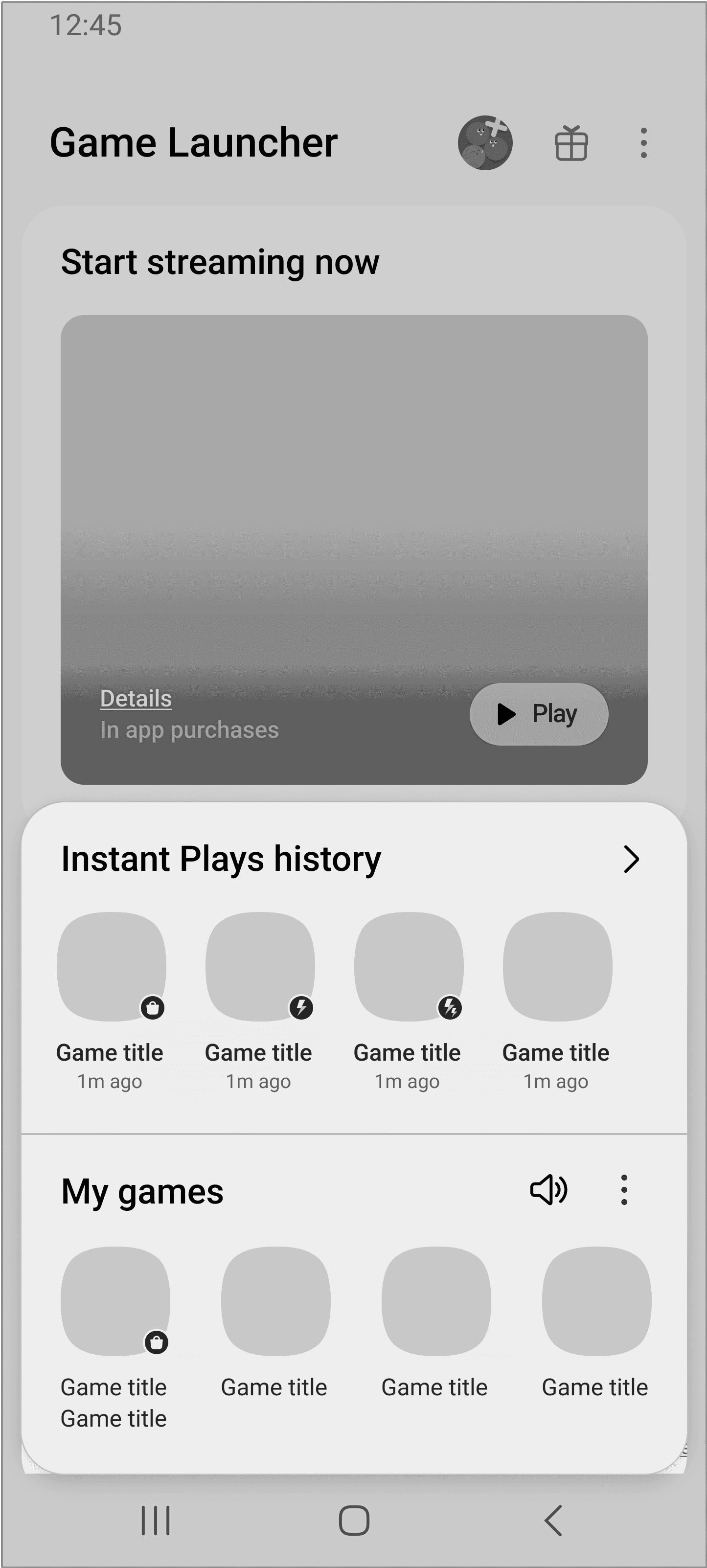
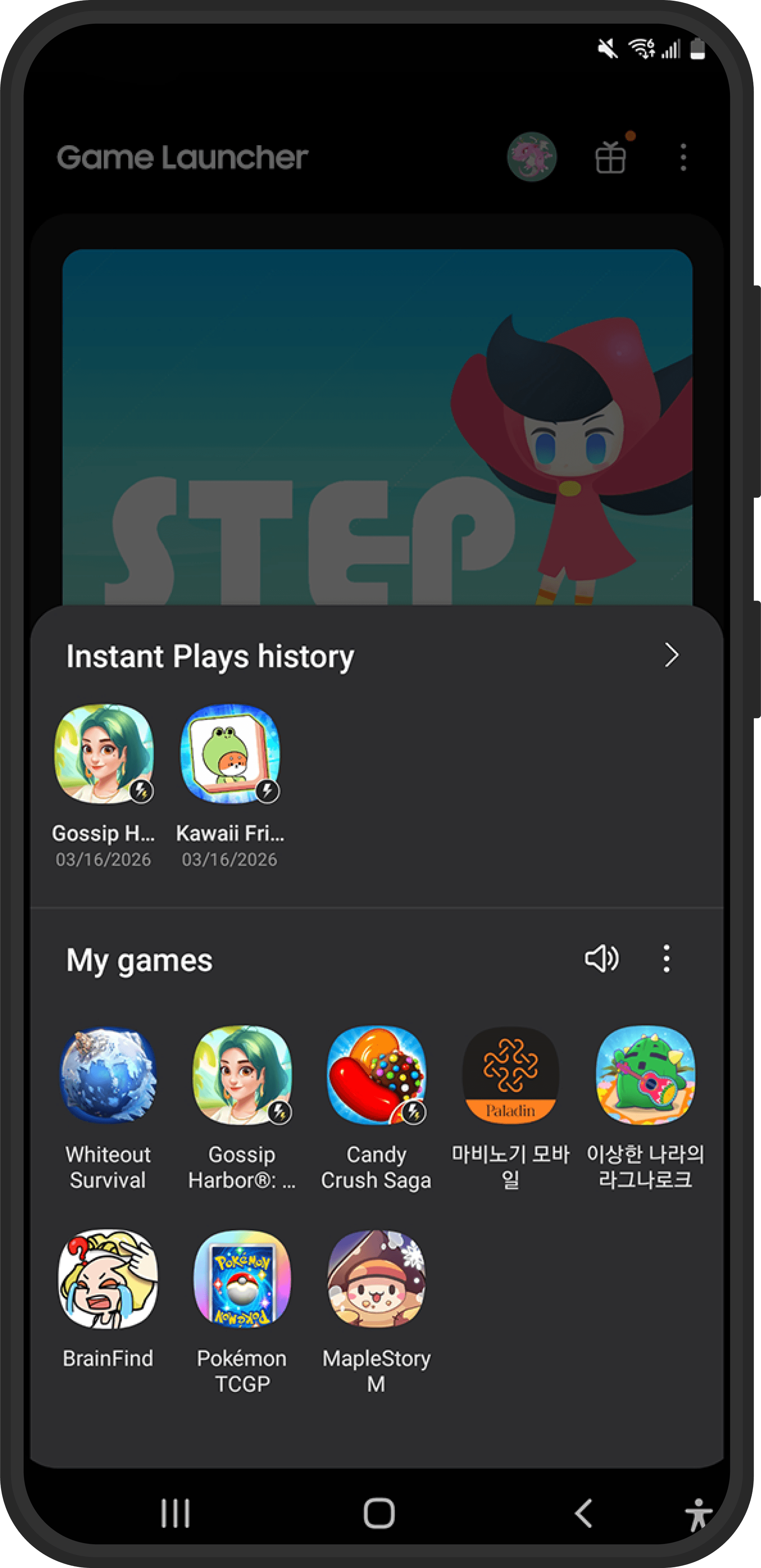
My Games section was restructured into a floating UI anchored to the bottom of the screen, making recently played games faster to access with a single tap and improving continuity within the main screen.
Long-pressing a game icon revealed additional details and submenu options, allowing secondary actions to remain available without overcrowding the default view. The sound control was moved into the expanded menu for better organization, and the confusing Do Not Disturb (Game Priority Mode) feature was removed to simplify the overall experience.
My Games User Flow
The updated flow clarified how users could access, manage, and launch games more efficiently within My Games.

My Games Wireframe
The wireframes translated the revised structure into a clearer, more streamlined interface focused on quick access and lightweight management.


Feature Details
The wireframes translated the revised structure into a clearer, more streamlined interface focused on quick access and lightweight management.

1
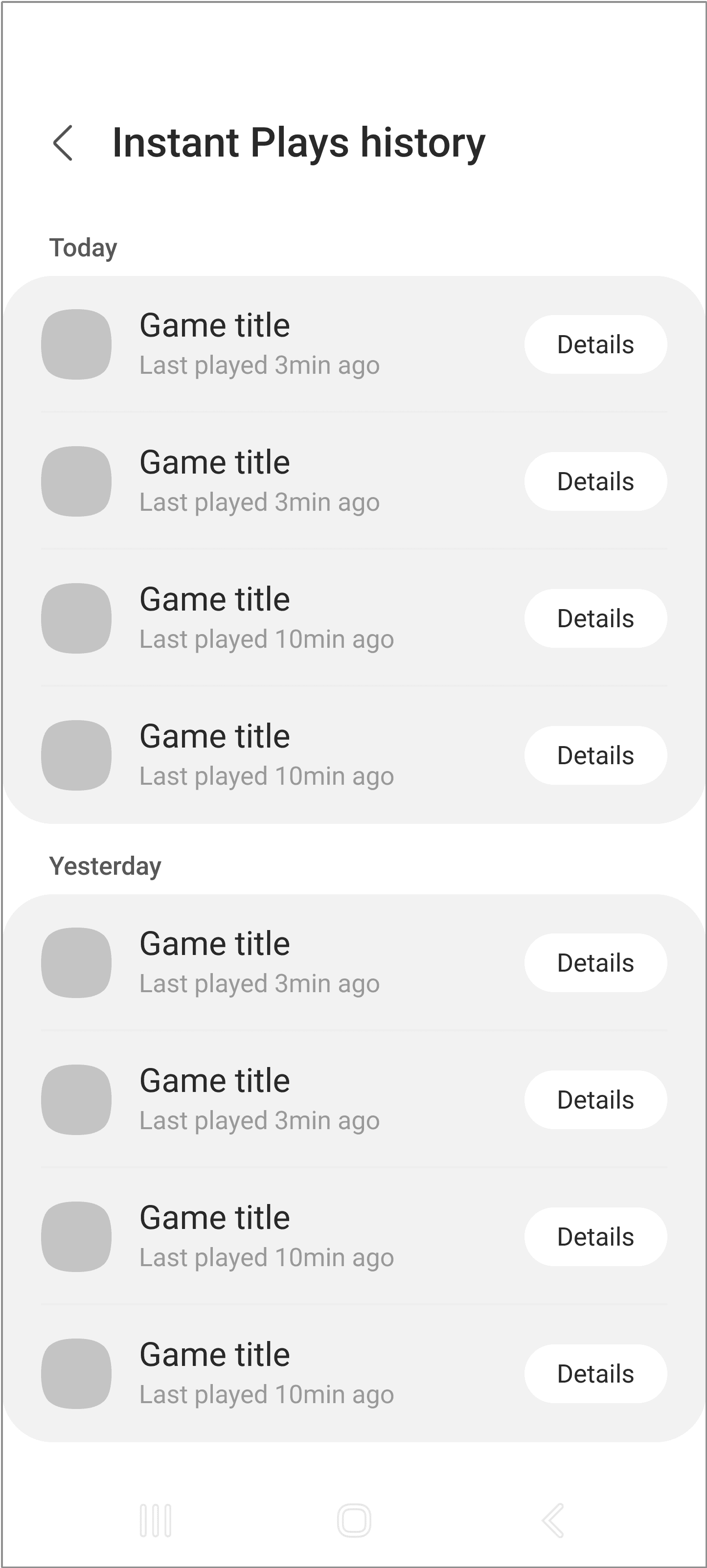
Instant Plays History
A quick-access row for recently launched instant play titles, helping users return to previously played games with minimal friction.
2
My Games Overview
A unified overview of the user’s played games, combining installed and instant play titles in one space for quicker scanning, easier access, and lighter management.
3
Installed Game Management Menu
A contextual action menu revealed through long press on an installed game.

App Info

Pin to top

Details

Remove from Game Launcher

Select

Uninstall

1
Instant Plays Management Menu
A contextual action menu revealed through long press on an installed game.
2
Multi-Select Action Bar
A bulk management mode that appears after entering selection mode, enabling users to manage multiple games at once.
User Insight
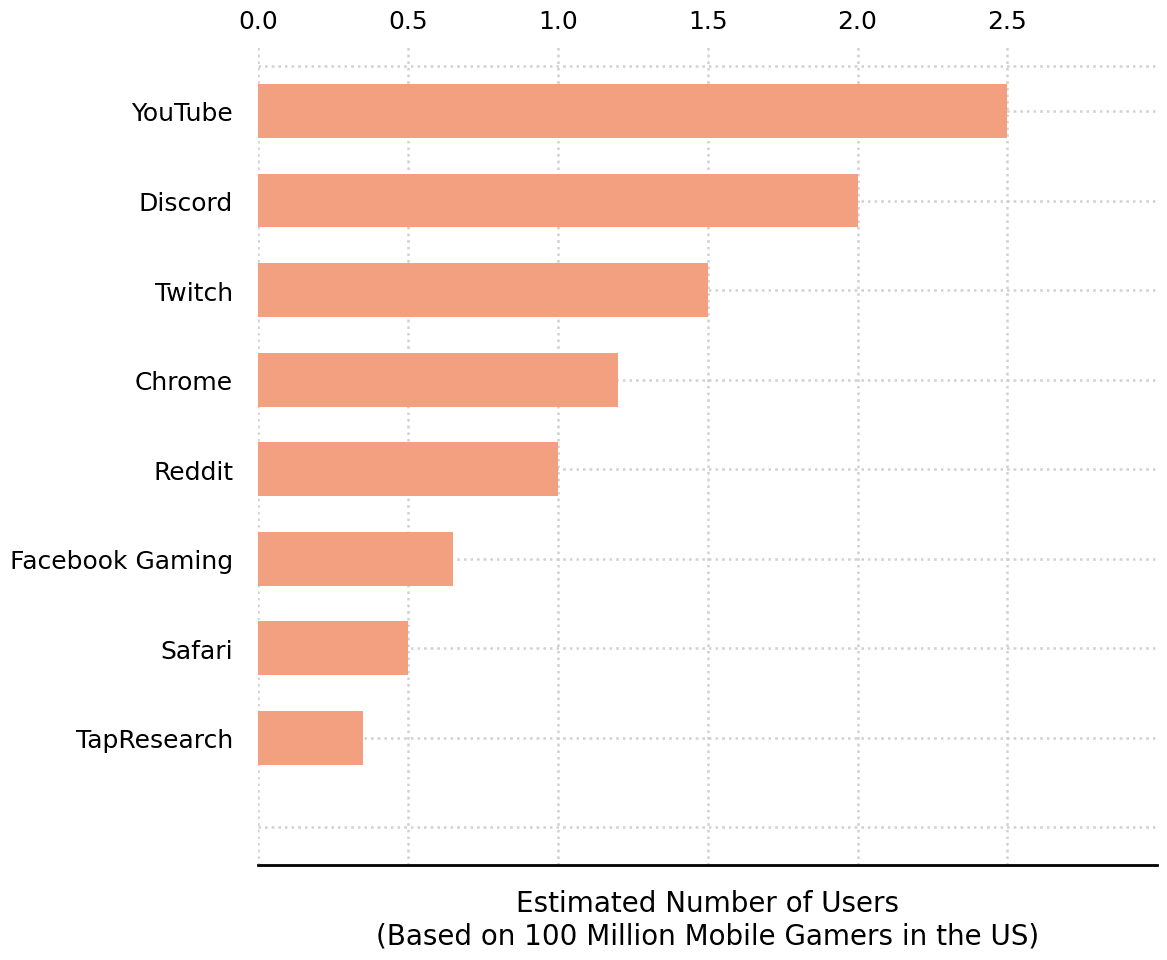
Mobile gameplay often extends beyond the game itself. Players frequently switch to other apps for information, community, and support while playing.
Most Frequently Opened Apps During Mobile Gameplay

Estimated App Usage During Mobile Gameplay
Gameplay is supported by companion apps
Players frequently open platforms such as YouTube, Discord, Twitch, and Chrome during gameplay, showing that gaming behavior often continues across multiple apps.
Information seeking is a major part of play
Many users rely on video guides, community forums, and streaming platforms to look up strategies, updates, and game-related content in real time.
The surrounding experience is fragmented
Although these resources are closely tied to gameplay, they are accessed outside the launcher, creating frequent app switching and a disconnected experience.
Persona & User Scenarios
To turn these patterns into more actionable design inputs, we defined three personas and gameplay scenarios that captured different types of support users needed during play.

Liam Brooks / College Student
Squad-Based FPS Player
“I hate switching screens just to talk to my team. I need fast access during the game.”
Scenario
Liam plays battle royale and squad-based shooters where real-time communication is essential.
Pain Point
To access Discord voice chat, he has to minimize the game and switch apps, which interrupts gameplay and slows down team coordination.
Design Need
A faster way to access communication tools with minimal disruption during play.

Grace Walker / Graphic Designer
Puzzle + RPG Player
“When I get stuck, I just want to quickly check a guide and get back into the game.”
Scenario
Grace plays puzzle and RPG games that often require reference-based problem solving, especially during long play sessions.
Pain Point
Checking YouTube guides or saved links forces her to leave the game, breaking flow and making it harder to return quickly.
Design Need
One-tap access to saved guides and reference content without unnecessary switching.

Hannah Clark / Operations Manager
Strategy + Card Game Player
“I’m always checking the meta.
I need quick access to forums without jumping through hoops.”
Scenario
Hannah plays strategic games where deck building, patch updates, and community discussions are part of the experience.
Pain Point
She frequently searches Reddit, Discord threads, and forums for strategies, but repeated app switching makes the process inefficient.
Design Need
Instant access to saved community pages and external resources during gameplay.


“I know what I need.
I just need a faster way to get to it.”
Although their behaviors differed, all three personas shared the same underlying need: fast access to external gameplay resources without breaking their flow.
Introducing Bookmark
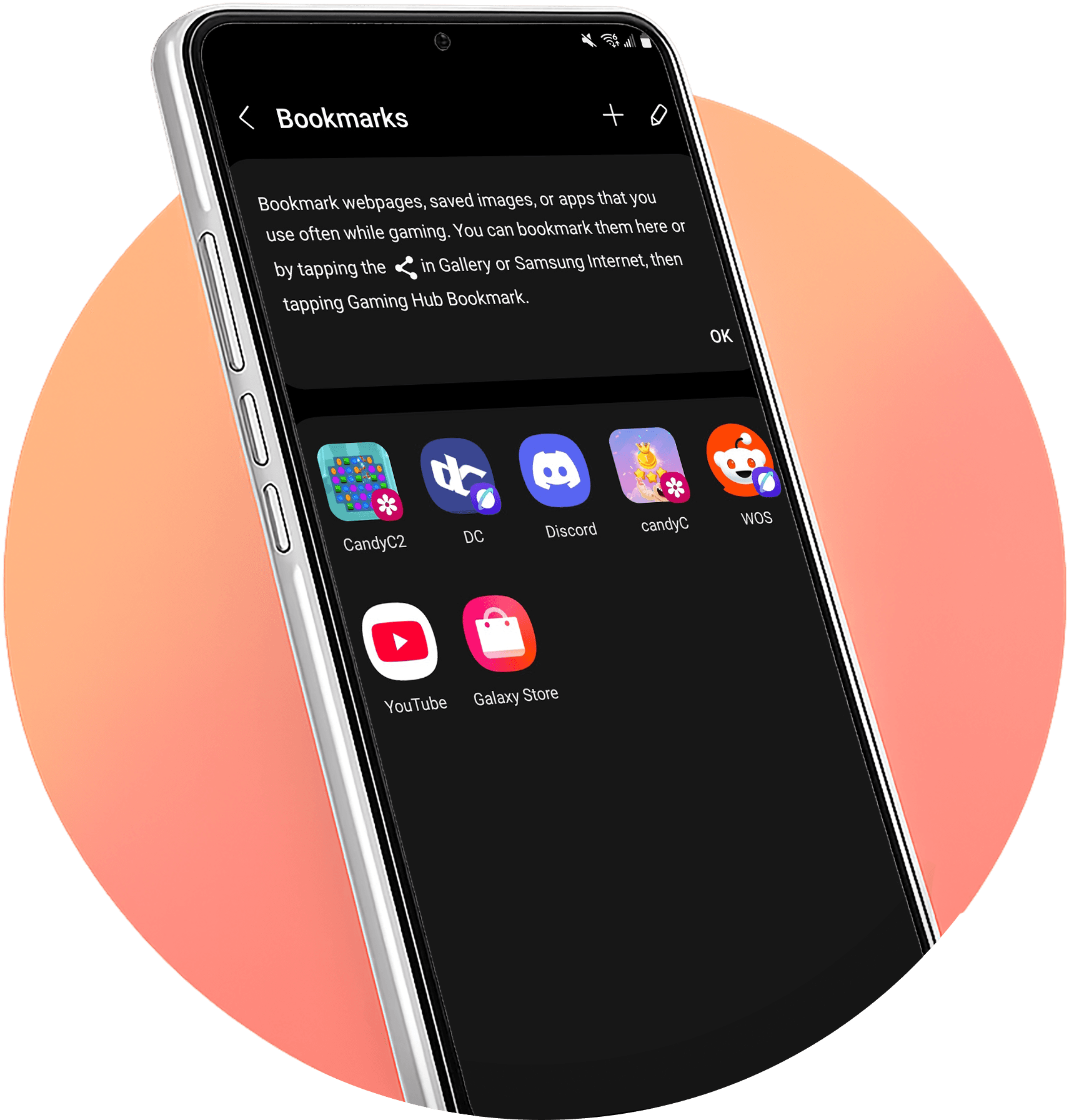
Bookmark was designed to help users keep gameplay-related resources organized and accessible within Game Launcher.
Instead of searching for the same guide again, looking through saved screenshots, or manually opening companion apps outside the launcher, users can save webpages, images, and app shortcuts in one dedicated place.
The goal was to reduce repeated effort and create a clearer path back to the resources users already rely on during gameplay.

Bookmark Feature

Save content for later
Users can bookmark games or content they find interesting during browsing. This allows them to keep items of interest without needing to take immediate action

Dedicated saved list
All bookmarked items are collected in one place, making it easy for users to review and manage what they have saved later.

Easy re-entry to saved content
Users can return to bookmarked items without repeating the same search or browsing process. This creates a smoother path back to content they were previously interested in.

Reduces rediscovery effort
It removes the need to remember previously seen content or search for it again from scratch.


Creates a more
continuous journey
Bookmark connects browsing with later action, making the overall experience feel more intentional and less temporary.
Bookmark User Flow
A user flow showing how different types of content are saved into Bookmark.

Bookmark Wireframe
The wireframes translated the revised structure into a clearer, more streamlined interface focused on quick access and lightweight management.


Feature Details
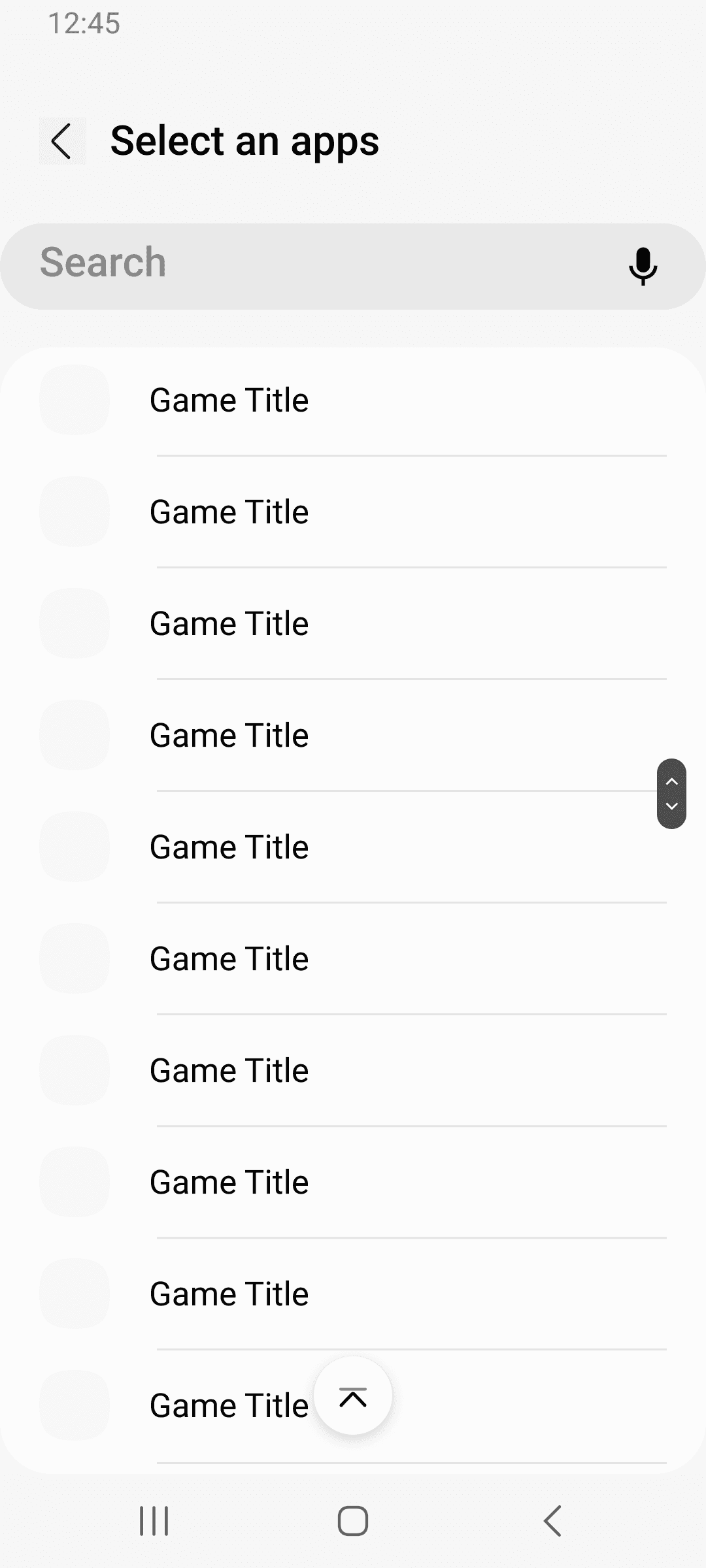
The Bookmark feature allows users to save webpages, images, and app shortcuts in one place for quicker access while gaming. The following screens outline the core flow for adding, viewing, and managing bookmarked content.


1
Bookmark Home
A central list view where users can see all saved bookmarks in one place. From this screen, users can add new bookmarks or enter edit mode to manage existing ones. To support quick access from the start, YouTube and Galaxy Store were provided as default bookmarks.
2
Add Bookmark Entry
An entry screen for creating new bookmarks. Users first choose the type of content they want to save, which helps structure the experience more clearly and guides them into the appropriate flow.
3
Web Page
A dedicated form for saving webpage bookmarks. By allowing users to manually enter a URL and title, the feature makes it easy to collect and revisit useful web content directly within Game Launcher
4
Pictures
A flow for adding image-based bookmarks through Samsung Gallery. Users are taken to the device’s gallery, where they can select an image and add it to their bookmarks, making frequently referenced visual content easier to access from Game Launcher.

5
Apps
A selection screen for adding app shortcuts as bookmarks. Search and list-based browsing make it easier to find and save relevant apps, extending the bookmark feature beyond static content.
6
Bookmark Edit Mode
A multi-select editing mode for managing existing bookmarks more efficiently. Users can select several items at once to edit or remove them, reducing friction when reorganizing a growing bookmark collection.
Bookmark & My Games

This project was my first assignment after moving from Made for Samsung team to Game Launcher team, and it also marked the beginning of my collaboration with Korea HQ team. Through this work, I gained a much deeper understanding of Game Launcher’s service direction, its core value, its primary users, and the target audience the Game Launcher team was focusing on. Learning a new domain and quickly understanding the service structure became an important foundation for the work that followed.
As someone who had already been a gamer, working on game-related features was especially engaging and meaningful to me. My own experience as a player helped me bring familiar user contexts, pain points, and expectations into the planning process more naturally. It was rewarding to see that this user perspective could translate into practical contributions to both feature ideas and UI improvements.
More importantly, this project went beyond simply adding new features. It was an opportunity to step back, review the overall UI structure and feature flows, and rethink the experience from the perspective of usability and convenience. The Bookmark and My Games improvements were not just isolated feature updates, but part of building a stronger foundation for Game Launcher to evolve in a more consistent and user-friendly direction. For me, this project became more than a feature improvement case—it was a meaningful starting point for future expansion and product growth.